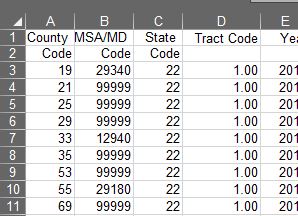
The QOZ project depends on census tract numbers. The tract number is the link between the sparse information about QOZs from the IRS, and the plethora of information from the Census and other sources. Long before we do that, however, we have to “clean” the various ways in which such numbers are presented. And that can be tricky.
The IRS identifies QOZs through an 11-digit tract number, without a decimal point. But according to the census, a “tract number” is four digits, with an optional two decimal points. How do we connect the census number to the number in the IRS’s list of QOZs?

To do this, we’re using Microsoft Excel. It’s a low-tech solution (as far as tech goes), but it’s what we have. We start by removing the decimal point, which seems* easy enough: simply multiply the decimal-annoted tract number by 100 (*it’s actually not that simple, but more on that later).
Then, we get the additional five digits from the two-digit state and three-digit county codes. Thus, 2+3+6 = 11 digits.

Those who know Excel (or any spreadsheet software) might see the problem as a simple one: simply concatenate the additional numbers. For example, if you have (in row “1”) a state code of “12” in column A, a county code of “123” in column B, and a tract code of “123456” in column C, then you can just make a column “D” with the following formula:
=A1&B1&C1This, in our example, gives a result of “12123123456.”
However, the number don’t always play nice. If you have a state code of “01”, a county code of “001” and a tract code of “000001”, then you’ll get three digits in column D: “111.” The problem stems from two areas: first, some government organizations will only provide the information as its number; second, even where that’s not the case, Excel wants to trim any unnecessary 0’s in front of anything it sees as a “number.” It likely goes without saying, data on tract “111” can’t be linked to tract “01001000001”.
Our spreadsheet therefore has to concatenate in a way that adds those preceding zeros. Without getting too deep into the details, our spreadsheet accomplishes by first creating three more columns that convert the county, state and tract codes into two, three and six digits, regardless of the actual “number.”
Here is what the actual formula looks like for the six-digit tract code in our spreadsheet:
=IF(G2<=99999, IF(G2<=9999, IF(G2<=999, IF(G2<=99, "0000"&G2,"000"&G2), "00"&G2), "0"&G2), G2)This formula basically says “If it’s a five-digit number, add a single zero in front of it, if it’s a four-digit number, add two zeros in front of it …” and so forth, until finally saying “…otherwise, don’t worry about adding any zeroes.” The result is that a tract code of “1” (technically that would be “.01” before multiplying by 100 to eliminate the decimal) becomes “000001”.
We still have another problem: Excel doesn’t sees the result as a number. This becomes a problem if we’re trying to link it to a spreadsheet that stores the tract code as a number. That’s because, Excel will see the number 12,123,123,456, and the sentence fragment “12123123456” and determine that the two are not the same, even though the two are equal in our eyes.
For our purposes, we fix this by adding one more piece to the formula that concatenates our “numbers” — the =DECIMAL() function. By nesting the concatenation formula in this function, we force Excel to convert the result into a (base 10) number.
=DECIMAL(A1&B1&C1,10)One important thing to note about the conversion to decimal: it doesn’t have to be done this way and, for some states, it can’t. Our initial efforts focus on the state of Louisiana, with a state code of “22”–this means that every 11-digit “text” will become an 11-digit “number.” If you were to do the same for Alabama, which has a state code of “01”, converting to a decimal would always result in a 10-digit number. Luckily, this works in reverse, too: by converting both into a “text.” The important thing is that, wherever we connect data, we must ensure both numbers end up as a comparable format.
Still with us? Hang in there: this is literally just the beginning.
With this out of the way, we can actually start exploring useful info from the Census, about our QOZs, such as demographics, poverty rates, how much rent costs and more.